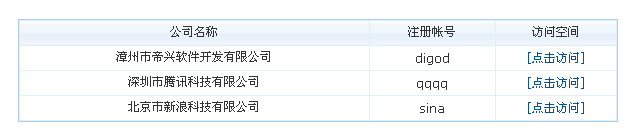
今天我们解密的是如何使用帝国CMS6.0新增的会员信息调用函数调用会员资料。
前言:
先前版本调用会员资料要通过SQL查询调用,对于比较基础的用户略显麻烦,所以V6.0直接内置调用函数,调用更简单。
两种调用函数:
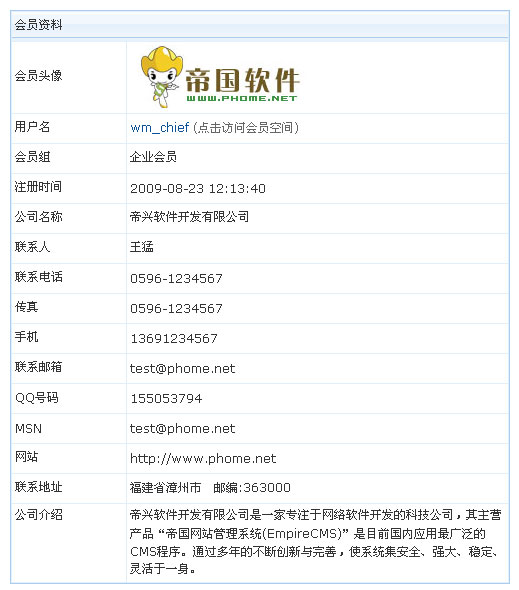
1、会员信息调用函数:sys_ShowMemberInfo(用户ID,查询字段)
| 用户ID:设置要调用的会员信息的用户ID,在信息内容页下调用可以设置为0,表示调用信息发布者的资料。 查询字段:默认为查询所有会员字段,此参数一般不用设置,如果为了效率更高可以指定相应的字段。如:“u.userid,ui.company”(u为主表,ui为副表)。 |
其它说明:函数返回结果为会员资料数组,显示用<?=$userr[字段名]?>
2、会员列表调用函数:sys_ListMemberInfo(调用条数,操作类型,会员组ID,用户ID,查询字段)
| 调用条数:调用前几条记录。 操作类型:0为按注册时间、1为按积分排行、2为按资金排行、3为按会员空间人气排行 会员组ID:指定要调用的会员组ID,不设置为不限,多个会员组用逗号隔开,如:’1,2′ 用户ID:指定要调用的会员ID,不设置为不限,多个用户ID用逗号隔开,如:’25,27′ 查询字段:默认为查询所有会员字段,此参数一般不用设置,如果为了效率更高可以指定相应的字段。如:“u.userid,ui.company”(u为主表,ui为副表)。 |
其它说明:函数返回结果为会员资料数组,显示用<?=$userr[字段名]?>
会员信息调用函数:sys_ShowMemberInfo
例子:在任意模板中加入:
<?php
$userr=sys_ShowMemberInfo(1,”);
?>
<table width=”500″ border=”0″ cellspacing=”1″ cellpadding=”3″ align=”center”>
<tr bgcolor=”#FFFFFF”>
<td height=”23″ colspan=”2″><font color=”#333333″>会员资料</font></td>
</tr>
<tr bgcolor=”#FFFFFF”>
<td height=”23″><font color=”#333333″>会员头像</font></td>
<td><img src=”<?=$userr[userpic]?$userr[userpic]:’/e/data/images/nouserpic.gif’?>” border=”0″></td>
</tr>
<tr bgcolor=”#FFFFFF”>
<td width=”23%” height=”23″><font color=”#333333″>用户名</font></td>
<td width=”77%”><a href=”/e/space/?userid=<?=$userr[userid]?>”><?=$userr[username]?></a>
<font color=”#666666″>(点击访问会员空间)</font></td>
</tr>
<tr bgcolor=”#FFFFFF”>
<td height=”23″><font color=”#333333″>会员组</font></td>
<td><?=$userr[groupname]?></td>
</tr>
<tr bgcolor=”#FFFFFF”>
<td height=”23″><font color=”#333333″>注册时间</font></td>
<td><?=$userr[registertime]?></td>
</tr>
<tr bgcolor=”#FFFFFF”>
<td height=”23″><font color=”#333333″>公司名称</font></td>
<td><?=$userr[company]?></td>
</tr>
<tr bgcolor=”#FFFFFF”>
<td height=”23″><font color=”#333333″>联系人</font></td>
<td><?=$userr[truename]?></td>
</tr>
<tr bgcolor=”#FFFFFF”>
<td height=”23″><font color=”#333333″>联系电话</font></td>
<td><?=$userr[call]?></td>
</tr>
<tr bgcolor=”#FFFFFF”>
<td height=”23″><font color=”#333333″>传真</font></td>
<td><?=$userr[fax]?></td>
</tr>
<tr bgcolor=”#FFFFFF”>
<td height=”23″><font color=”#333333″>手机</font></td>
<td><?=$userr[phone]?></td>
</tr>
<tr bgcolor=”#FFFFFF”>
<td height=”23″><font color=”#333333″>联系邮箱</font></td>
<td><?=$userr[email]?></td>
</tr>
<tr bgcolor=”#FFFFFF”>
<td height=”23″><font color=”#333333″>QQ号码</font></td>
<td><?=$userr[oicq]?></td>
</tr>
<tr bgcolor=”#FFFFFF”>
<td height=”23″><font color=”#333333″>MSN</font></td>
<td><?=$userr[msn]?></td>
</tr>
<tr bgcolor=”#FFFFFF”>
<td height=”23″><font color=”#333333″>网站</font></td>
<td><?=$userr[homepage]?></td>
</tr>
<tr bgcolor=”#FFFFFF”>
<td height=”23″><font color=”#333333″>联系地址</font></td>
<td><?=$userr[address]?> 邮编:<?=$userr[zip]?></td>
</tr>
<tr bgcolor=”#FFFFFF”>
<td height=”23″ valign=”top”><font color=”#333333″>公司介绍</font></td>
<td><?=nl2br($userr[saytext])?></td>
</tr>
</table>
显示效果:
会员列表调用函数:sys_ListMemberInfo
例子:在任意模板中加入:
<table width=”600″ border=”0″ align=”center” cellpadding=”3″ cellspacing=”1″>
<tr>
<td width=”345″><div align=”center”>公司名称</div></td>
<td width=”119″><div align=”center”>注册帐号</div></td>
<td width=”114″><div align=”center”>访问空间</div></td>
</tr>
<?php
$usersql=sys_ListMemberInfo(3,0,’3′,”,”);
while($userr=$empire->fetch($usersql))
{
?>
<tr bgcolor=”#FFFFFF”>
<td>
<div align=”center”>
<?=$userr[company]?>
</div></td>
<td>
<div align=”center”>
<?=$userr[username]?>
</div></td>
<td>
<div align=”center”><a href=”/e/space/?userid=<?=$userr[userid]?>”>[点击访问]</a></div></td>
</tr>
<?php
}
?>
</table>