更新 ports
第一种方式: portsnap (自带)
首先修改/etc/portsnap.conf
SERVERNAME=portsnap.cn.freebsd.org
1.下载压缩的 Ports 套件快照到 /var/db/portsnap
# portsnap fetch
2.假如是首次运行 Portsnap, 则需要将快照释放到 /usr/ports:
# portsnap extract
如果您已经有装好的 /usr/ports 而只想更新, 则应执行下面的命令:
# portsnap update
完成后需要退出终端重新登陆。
复制cvsup更新配置文件
# cp /usr/share/examples/cvsup/ports-supfile /etc/supfile
下面是我使用的配置,屏蔽了desktop等一些服务器用不到的软件包,源已经改成中国镜像,速度比国外的主服务器要快很多
# $FreeBSD: release/9.0.0/share/examples/cvsup/ports-supfile 219858 2011-03-22 04:31:35Z glebius $
#
# This file contains all of the “CVSup collections” that make up the
# FreeBSD-current ports collection.
#
# CVSup (CVS Update Protocol) allows you to download the latest CVS
# tree (or any branch of development therefrom) to your system easily
# and efficiently (far more so than with sup, which CVSup is aimed
# at replacing). If you’re running CVSup interactively, and are
# currently using an X display server, you should run CVSup as follows
# to keep your CVS tree up-to-date:
#
# cvsup ports-supfile
#
# If not running X, or invoking cvsup from a non-interactive script, then
# run it as follows:
#
# cvsup -g -L 2 ports-supfile
#
# You may wish to change some of the settings in this file to better
# suit your system:
#
# host=CHANGE_THIS.FreeBSD.org
# This specifies the server host which will supply the
# file updates. You must change it to one of the CVSup
# mirror sites listed in the FreeBSD Handbook at
# http://www.freebsd.org/doc/handbook/cvsup.html#CVSUP-MIRRORS.
# You can override this setting on the command line
# with cvsup’s “-h host” option.
#
# base=/var/db
# This specifies the root where CVSup will store information
# about the collections you have transferred to your system.
# A setting of “/var/db” will generate this information in
# /var/db/sup. You can override the “base” setting on the
# command line with cvsup’s “-b base” option. This directory
# must exist in order to run CVSup.
#
# prefix=/usr
# This specifies where to place the requested files. A
# setting of “/usr” will place all of the files requested
# in “/usr/ports” (e.g., “/usr/ports/devel”, “/usr/ports/lang”).
# The prefix directory must exist in order to run CVSup.
# Defaults that apply to all the collections
#
# IMPORTANT: Change the next line to use one of the CVSup mirror sites
# listed at http://www.freebsd.org/doc/handbook/cvsup.html#CVSUP-MIRRORS.
*default host=cvsup.cn.FreeBSD.org
*default base=/var/db
*default prefix=/usr
*default release=cvs tag=.
*default delete use-rel-suffix
# If you seem to be limited by CPU rather than network or disk bandwidth, try
# commenting out the following line. (Normally, today’s CPUs are fast enough
# that you want to run compression.)
*default compress
## Ports Collection.
#
# The easiest way to get the ports tree is to use the “ports-all”
# mega-collection. It includes all of the individual “ports-*”
# collections,
#ports-all
# These are the individual collections that make up “ports-all”. If you
# use these, be sure to comment out “ports-all” above.
#
# Be sure to ALWAYS cvsup the ports-base collection if you use any of the
# other individual collections below. ports-base is a mandatory collection
# for the ports collection, and your ports may not build correctly if it
# is not kept up to date.
ports-base
#ports-accessibility
#ports-arabic
ports-archivers
#ports-astro
#ports-audio
ports-benchmarks
#ports-biology
#ports-cad
#ports-chinese
#ports-comms
ports-converters
ports-databases
#ports-deskutils
ports-devel
ports-dns
ports-editors
#ports-emulators
#ports-finance
#ports-french
ports-ftp
#ports-games
#ports-german
#ports-graphics
#ports-hebrew
#ports-hungarian
#ports-irc
#ports-japanese
#ports-java
#ports-korean
ports-lang
ports-mail
ports-math
ports-misc
#ports-multimedia
ports-net
#ports-net-im
#ports-net-mgmt
#ports-net-p2p
#ports-news
#ports-palm
#ports-polish
#ports-ports-mgmt
#ports-portuguese
#ports-print
#ports-russian
#ports-science
ports-security
ports-shells
ports-sysutils
ports-textproc
#ports-ukrainian
#ports-vietnamese
ports-www
#ports-x11
#ports-x11-clocks
#ports-x11-drivers
#ports-x11-fm
#ports-x11-fonts
#ports-x11-servers
#ports-x11-themes
#ports-x11-toolkits
#ports-x11-wm
然后 更新 Ports到最新
# cvsup -L 2 -g /etc/supfile
安装 screen(这个是很有必要,除非你在本地)
除非你确信在最长可达半天的编译时间里不会因为任何因素掉线,否则尽可能用屏幕保持软件,如果编译一大半突然断线,那就很麻烦了
# cd /usr/ports/sysutils/screen/
# make install clean
options 里直接点 OK 就可以了。编译安装完成后,打入 screen 进入 screen 环境,会有一个提示信息,直接点击回车就好,然后正常进行编译过程。如果断线,可以在重新连上 SSH 后通过下面的命令回到前面的工作中。
screen -r
安装 MySQL
Ports 里提供了很多版本的 MySQL,这里我选择了 5.5
# cd /usr/ports/databases/mysql55-server
# make WITH_CHARSET=gbk WITH_XCHARSET=all BUILD_OPTIMIZED=yes BUILD_STATIC=yes install clean
即可,慢慢等吧,要花一些时间的。
如果提示 Error when bootstrapping CMake: Cannot find appropriate Makefile processor on this system. Please specify one using environment variable MAKE.
安装下cmake即可:
pkg_add cmake -v -r
安装完成后,在 /usr/local/share/mysql/ 里有很多预先设置好的 MySQL 配置文件,可以根据自己的需要选择这些预先设置好的文件,或者根据自己的需要,写配置文件。
# cp /usr/local/share/mysql/my-medium.cnf /usr/local/etc/my.cnf
# rehash
# echo mysql_enable=”YES” >> /etc/rc.conf
# /usr/local/etc/rc.d/mysql-server start
FreeBSD 下安装 MySQL 后,脚本会自动为其建立用户、用户组 mysql。可以根据自己需要,设置安全策略。
安装 PHP 版本 5.3 .10
# cd /usr/ports/lang/php5/
# make config
这里我根据自己需要,选择了(图片截取自5.3.9)
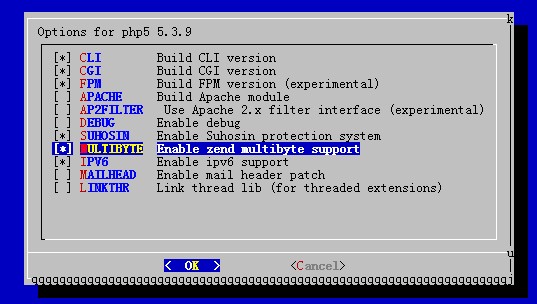
# make install clean
之后安装 PHP5 的扩展库
# cd /usr/ports/lang/php5-extensions
# make config
在对话框中,选择需要的(编译扩展是最耗时间的,至少2-3小时以上,根据需要能少选就少选!以后可以单个安装)
[X] BCMATH bc style precision math functions
[X] BZ2 bzip2 library support
[ ] CALENDAR calendar conversion support
[X] CTYPE ctype functions
[X] CURL CURL support
[ ] DBA dba support
[ ] DBASE dBase library support
[X] DOM DOM support
[ ] EXIF EXIF support
[ ] FILEINFO fileinfo support
[X] FILTER input filter support
[ ] FRIBIDI FriBidi support
[X] FTP FTP support
[X] GD GD library support
[ ] GETTEXT gettext library support
[ ] GMP GNU MP support
[X] HASH HASH Message Digest Framework
[X] ICONV iconv support
[ ] IMAP IMAP support
[ ] INTERBASE Interbase 6 database support (Firebird)
[X] JSON JavaScript Object Serialization support
[ ] LDAP OpenLDAP support
[ ] MBSTRING multibyte string support
[X] MCRYPT Encryption support
[X] MHASH Crypto-hashing support
[ ] MING ming shockwave flash support
[ ] MSSQL MS-SQL database support
[X] MYSQL MySQL database support
[ ] MYSQLI MySQLi database support
[ ] NCURSES ncurses support (CLI only)
[ ] ODBC unixODBC support
[X] OPENSSL OpenSSL support
[ ] PCNTL pcntl support (CLI only)
[X] PCRE Perl Compatible Regular Expression support
[ ] PDF PDFlib support (implies GD)
[X] PDO PHP Data Objects Interface (PDO)
[X] PDO_SQLITE PDO sqlite driver
[X] PDO_MYSQL PDO mysql driver
[ ] PGSQL PostgreSQL database support
[X] POSIX POSIX-like functions
[ ] PSPELL pspell support
[ ] READLINE readline support (CLI only)
[ ] RECODE recode support
[X] SESSION session support
[ ] SHMOP shmop support
[X] SIMPLEXML simplexml support
[ ] SNMP SNMP support
[X] SOAP SOAP support
[X] SOCKETS sockets support
[X] SPL Standard PHP Library
[X] SQLITE sqlite support
[ ] SYBASE_CT Sybase database support
[ ] SYSVMSG System V message support
[ ] SYSVSEM System V semaphore support
[ ] SYSVSHM System V shared memory support
[ ] TIDY TIDY support
[X] TOKENIZER tokenizer support
[ ] WDDX WDDX support (implies XML)
[X] XML XML support
[X] XMLREADER XMLReader support
[ ] XMLRPC XMLRPC-EPI support
[X] XMLWRITER XMLWriter support
[ ] XSL XSL support (Implies DOM)
[ ] YAZ YAZ support (ANSI/NISO Z39.50)
[X] ZIP ZIP support
[X] ZLIB ZLIB support
选择完成后,继续
# make install clean
经过漫长的等待(估计得一个多小时呢),终于完成了编译。启用 PHP-FPM
# echo php_fpm_enable=”YES” >> /etc/rc.conf
# /usr/local/etc/rc.d/php-fpm start
PHP-FPM 的配置文件,在 FreeBSD 下位于 /usr/local/etc/php-fpm.conf,可以自行更改
安装 nginx
nginx 的编译所用的时间相对于前两个东西而言,就快非常多了
# cd /usr/ports/www/nginx
# make install clean
编译选项
[ ] DEBUG Enable nginx debugging
[ ] DEBUGLOG Enable debug log (–with-debug)
[ ] FILE_AIO Enable file aio
[X] IPV6 Enable IPv6
[ ] GOOGLE_PERFTOOLS Enable google perftools module
[X] HTTP_MODULE Enable HTTP module
[ ] HTTP_ADDITION_MODULE Enable http_addition module
[X] HTTP_CACHE_MODULE Enable http_cache module
[ ] HTTP_DAV_MODULE Enable http_webdav module
[ ] HTTP_FLV_MODULE Enable http_flv module
[ ] HTTP_GEOIP_MODULE Enable http_geoip module
[X] HTTP_GZIP_STATIC_MODULE Enable http_gzip_static module
[ ] HTTP_IMAGE_FILTER_MODULE Enable http_image_filter module
[ ] HTTP_PERL_MODULE Enable http_perl module
[ ] HTTP_RANDOM_INDEX_MODULE Enable http_random_index module
[ ] HTTP_REALIP_MODULE Enable http_realip module
[X] HTTP_REWRITE_MODULE Enable http_rewrite module
[ ] HTTP_SECURE_LINK_MODULE Enable http_secure_link module
[X] HTTP_SSL_MODULE Enable http_ssl module
[X] HTTP_STATUS_MODULE Enable http_stub_status module
[ ] HTTP_SUB_MODULE Enable http_sub module
[ ] HTTP_XSLT_MODULE Enable http_xslt module
[ ] MAIL_MODULE Enable IMAP4/POP3/SMTP proxy modul
[ ] MAIL_IMAP_MODULE Enable IMAP4 proxy module
[ ] MAIL_POP3_MODULE Enable POP3 proxy module
[ ] MAIL_SMTP_MODULE Enable SMTP proxy module
[ ] MAIL_SSL_MODULE Enable mail_ssl module
[X] WWW Enable html sample files
[ ] CACHE_PURGE_MODULE 3rd party cache_purge module
[ ] ECHO_MODULE 3rd party echo module
[ ] HEADERS_MORE_MODULE 3rd party headers_more module
[ ] HTTP_ACCEPT_LANGUAGE 3rd party accept_language module
[ ] HTTP_ACCESSKEY_MODULE 3rd party http_accesskey module
[ ] HTTP_AUTH_PAM_MODULE 3rd party http_auth_pam module
[ ] HTTP_AUTH_REQ_MODULE 3rd party http_auth_request module
[ ] HTTP_EVAL_MODULE 3rd party eval module
[ ] HTTP_FANCYINDEX_MODULE 3rd party http_fancyindex module
[ ] HTTP_GUNZIP_FILTER 3rd party http_gunzip_filter modul
[ ] HTTP_MOGILEFS_MODULE 3rd party mogilefs module
[ ] HTTP_MP4_H264_MODULE 3rd party mp4/h264 module
[ ] HTTP_NOTICE_MODULE 3rd party notice module
[ ] HTTP_PUSH_MODULE 3rd party push module
[ ] HTTP_REDIS_MODULE 3rd party http_redis module
[ ] HTTP_RESPONSE_MODULE 3rd party http_response module
[ ] HTTP_UPLOAD_MODULE 3rd party upload module
[ ] HTTP_UPLOAD_PROGRESS 3rd party uploadprogress module
[ ] HTTP_UPSTREAM_FAIR 3rd party upstream fair module
[ ] HTTP_UPSTREAM_HASH 3rd party upstream hash module
[ ] HTTP_UPSTREAM_KEEPALIVE 3rd party upstream keepalive modul
[ ] HTTP_ZIP_MODULE 3rd party http_zip module
[ ] MEMC_MODULE 3rd party memc (memcached) module
[ ] PASSENGER_MODULE 3rd party passenger module
[ ] SLOWFS_CACHE_MODULE 3rd party slowfs_cache module
[ ] SUPERVISORD_MODULE 3rd party supervisord module
[ ] SYSLOG_SUPPORT 3rd party syslog support
[ ] UDPLOG_MODULE 3rd party udplog (syslog) module
编译完成后,启动 nginx
# echo nginx_enable=”YES” >> /etc/rc.conf
这里先不急着 start nginx,因为现在还没有对 PHP 的支持。
# vi /usr/local/etc/nginx/nginx.conf
将如下段落前的 “#” 删除,并且将 html 更改为 /usr/local/www/nginx
location ~ \.php$ {
root /usr/local/www/nginx;
fastcgi_pass 127.0.0.1:9000;
fastcgi_index index.php;
fastcgi_param SCRIPT_FILENAME /scripts$fastcgi_script_name;
include fastcgi_params;
}
结束后,编辑 /usr/local/etc/nginx/fastcgi_params,加入
fastcgi_param SCRIPT_FILENAME $document_root$fastcgi_script_name;
启动 nginx,看看是否已经对 PHP 了
# /usr/local/etc/rc.d/nginx start
# echo “<?php phpinfo() ?>” > /usr/local/www/nginx/info.php
访问 http://yourdomain/info.php,看到 phpinfo 的页面则证明无误。
安装 eAcceletrator
eAcceletrator 可以预编译你的 PHP,这样执行的时候,就会起到加速作用。(下图红色地址部分需要根据自己编译结束后给出的地址修改)
# cd /usr/ports/www/eaccelerator
# make install clean
# echo zend_extension=”/usr/local/lib/php/20060613/eaccelerator.so” >> /usr/local/etc/php.ini
# mkdir /tmp/eaccelerator
# chown www /tmp/eaccelerator
# chmod 0700 /tmp/eaccelerator
# /usr/local/etc/rc.d/php-fpm restart
再刷新刚才的 info.php,看看是不是加入了 eAcceletrator 的支持
安装memcached
cd /usr/ports/databases/memcached
make install clean
cd /usr/ports/databases/pecl-memcache
make install clean
echo “memcached_enable=YES” >> /etc/rc.conf
开启 /usr/local/etc/rc.d/memcached start
下面附上安装过程中会下载的软件(只供大致参考,一般都需要自己下载,可以配置163的镜像源)
/usr/ports/distfiles/xcb-proto-1.6.tar.bz2
/usr/ports/distfiles/varnish-3.0.2.tar.gz
/usr/ports/distfiles/unzip60.tar.gz
/usr/ports/distfiles/tcl8.5.11-src.tar.gz
/usr/ports/distfiles/t1lib-5.1.2.tar.gz
/usr/ports/distfiles/suhosin-patch-5.3.9-0.9.10.patch.gz
/usr/ports/distfiles/sqlite-src-3071000.zip
/usr/ports/distfiles/screen-4.0.3.tar.gz
/usr/ports/distfiles/repcached-2.3.1-1.4.10.patch.gz
/usr/ports/distfiles/redis-2.4.4.tar.gz
/usr/ports/distfiles/php-5.3.9.tar.bz2
/usr/ports/distfiles/pcre-8.21.tar.bz2
/usr/ports/distfiles/pcre-8.20.tar.bz2
/usr/ports/distfiles/openldap-2.4.26.tgz
/usr/ports/distfiles/nss-3.13.1.with.ckbi.1.88.tar.gz
/usr/ports/distfiles/nload-0.7.3.tar.gz
/usr/ports/distfiles/Nginx_upstream_hash-0.3.1.tar.gz
/usr/ports/distfiles/nginx_upstream_fair-20090923.tar.gz
/usr/ports/distfiles/nginx-1.0.11.tar.gz
/usr/ports/distfiles/mysql-5.5.20.tar.gz
/usr/ports/distfiles/memcached-1.4.10.tar.gz
/usr/ports/distfiles/make-3.82.tar.bz2
/usr/ports/distfiles/m4-1.4.16.tar.bz2
/usr/ports/distfiles/libxcb-1.7.tar.bz2
/usr/ports/distfiles/libtool-2.4.tar.gz
/usr/ports/distfiles/libpthread-stubs-0.3.tar.bz2
/usr/ports/distfiles/libpng-1.4.8.tar.xz
/usr/ports/distfiles/libpng-1.4.8-apng.patch.gz
/usr/ports/distfiles/libmcrypt-2.5.8.tar.gz
/usr/ports/distfiles/libiconv-1.13.1.tar.gz
/usr/ports/distfiles/libgpg-error-1.10.tar.bz2
/usr/ports/distfiles/libgcrypt-1.5.0.tar.bz2
/usr/ports/distfiles/libexecinfo-1.1.tar.bz2
/usr/ports/distfiles/libevent-1.4.14b-stable.tar.gz
/usr/ports/distfiles/IO-Tty-1.10.tar.gz
/usr/ports/distfiles/help2man-1.40.5.tar.gz
/usr/ports/distfiles/haproxy-1.4.16.tar.gz
/usr/ports/distfiles/gettext-1.05.tar.gz
/usr/ports/distfiles/gettext-0.18.1.1.tar.gz
/usr/ports/distfiles/freetype-2.4.7.tar.bz2
/usr/ports/distfiles/eaccelerator-0.9.6.1.tar.bz2
/usr/ports/distfiles/cyrus-sasl-2.1.25.tar.gz
/usr/ports/distfiles/curl-7.21.3.tar.bz2
/usr/ports/distfiles/cmake-2.8.7.tar.gz
/usr/ports/distfiles/check-0.9.8.tar.gz
/usr/ports/distfiles/automake-1.11.1.tar.bz2
/usr/ports/distfiles/autoconf-2.68.tar.bz2
/usr/ports/distfiles/agentzh-headers-more-nginx-module-v0.16-0-gde77fd2.tar.gz
/usr/ports/distfiles/xorg
/usr/ports/distfiles/ruby
/usr/ports/distfiles/python
/usr/ports/distfiles/PECL
/usr/ports/distfiles/jpeg8b2
/usr/ports/distfiles/gnome2
最后说一下安装phpMyAdmin
cd /usr/ports/databases/phpmyadmin
make install clean
Alias /phpmyadmin /usr/local/www/phpMyAdmin
修改nginx.conf文件
vi /usr/local/etc/nginx/nginx.conf
在主域名下面插入
location /phpmyadmin/ {
alias /usr/local/www/nginx/phpMyAdmin/;
index index.php index.html index.htm;
}
Location ~ ^/phpmyadmin/(.*\.php)$ {
root /usr/local/www/nginx/phpMyAdmin/;
fastcgi_pass unix:/tmp/php-fpm.sock;
include fastcgi_params;
fastcgi_param SCRIPT_FILENAME /usr/local/www/nginx/phpMyAdmin/$1;
fastcgi_param DOCUMENT_ROOT /usr/local/www/nginx/phpMyAdmin;
}
然后
cd /usr/local/www/phpMyAdmin
mkdir config
chmod 777 config
phpMyAdmin by going to http://hostname/phpmyadmin/setup/index.php in your browser and set at least the following:
做好了一些基本的设置后
cp config/config.inc.php .
rm -rf config
chmod 444 config.inc.php
这样就可以访问phpMyAdmin了
以上参考的网站