分类: 菜鸟Linux笔记

菜鸟学习LINUX笔记

  • lftp使用

    命令:

    lftp user@site:port


    这个命令可以防止密码以明文出现。


    终端:


    man lftp


    进入lftp后


    help


    获得帮助


    就可以看到命令列表


    下面我们看一下lftp常用的命令:


    ls

    显示远端文件列表。

    cd

    切换远端目录。

    get

    下载远端文件。

    mget

    下载远端文件(可以用通配符也就是 *)。

    pget

    使用多个线程来下载远端文件, 预设为五个。

    mirror

    下载/上传/同步 整个目录。

    put

    上传文件。

    mput

    上传多个文件(支持通配符)。

    mv

    移动远端文件(远端文件改名)。

    rm

    删除远端文件。

    mrm

    删除多个远端文件(支持通配符)。

    mkdir

    建立远端目录。

    rmdir

    删除远端目录。

    pwd

    显示目前远端所在目录。

    du

    计算远端目录的大小

    !

    执行本地 shell的命令(由于lftp 没有 lls, 故可用 !ls 来替代)

    lcd

    切换本地目录

    lpwd

    显示本地目录

    alias

    定义别名

    bookmark

    设定书签。

    exit

    退出ftp

  • Nginx 301重定向域名

    Nginx 301重定向域名

    为何要使用301重定向

    在网站建设中需要网页重定向的情况很多:如网页目录结构变动,网页重命名、网页的扩展名改变、网站域名改变等。如果不做重定向,用户的收藏和搜索引擎数据库中的旧地址只能让访客得到一个404错误信息页面,访问流量白白丧失。不仅如此,之前该页面的一切积累(比如PR值)就都白费了。


    301重定向不仅能使页面实现自动跳转,对于搜索引擎来说,也可能可以传递PR值。


    nginx重定向规则详细介绍

    rewrite命令

    nginx的rewrite相当于apache的rewriterule(大多数情况下可以把原有apache的rewrite规则加上引号就可以直接使用),它可以用在server,location 和IF条件判断块中,命令格式如下:

    rewrite 正则表达式 替换目标 flag标记

    flag标记可以用以下几种格式:

    last – 基本上都用这个Flag。

    break – 中止Rewirte,不在继续匹配

    redirect – 返回临时重定向的HTTP状态302

    permanent – 返回永久重定向的HTTP状态301

    例如下面这段设定nginx将某个目录下面的文件重定向到另一个目录,$2对应第二个括号(.*)中对应的字符串:

    location /download/ {

    rewrite ^(/download/.*)/m/(.*)\..*$ $1/nginx-rewrite/$2.gz break;

    }


    nginx重定向的IF条件判断

    在server和location两种情况下可以使用nginx的IF条件判断,条件可以为以下几种:

    正则表达式


    如:

    匹配判断

    ~ 为区分大小写匹配; !~为区分大小写不匹配

    ~* 为不区分大小写匹配;!~为不区分大小写不匹配

    例如下面设定nginx在用户使用ie的使用重定向到/nginx-ie目录下:

    if ($http_user_agent ~ MSIE) {

    rewrite ^(.*)$ /nginx-ie/$1 break;

    }

    文件和目录判断

    -f和!-f判断是否存在文件

    -d和!-d判断是否存在目录

    -e和!-e判断是否存在文件或目录

    -x和!-x判断文件是否可执行

    例如下面设定nginx在文件和目录不存在的时候重定向:

    if (!-e $request_filename) {

    proxy_pass http://127.0.0.1/;

    }


    return

    返回http代码,例如设置nginx防盗链:

    location ~* \.(gif|jpg|png|swf|flv)$ {

    valid_referers none blocked http://www.yourname.com/ http://www.yourname.com/;

    if ($invalid_referer) {

    return 404;

    }

    }


    set

    设置nginx变量


    301重定向方法

    进行了301重定向,把www .yourname.com和yourname.com合并,并把之前的域名也一并合并. 有两种实现方法,第一种方法是判断nginx核心变量host(老版本是http_host):

    server {

    server_name www.yourname.com yourname.com ;

    if ($host != ‘www.yourname.com’ ) {

    rewrite ^/(.*)$ http://www.yourname.com/$1 permanent;

    }

    }

    第二种方法:

    server {

    server_name yourname.com;

    rewrite ^/(.*) http://www.yourname.com/$1 permanent;

    }


    测试了第一种方法ok,这两种方法中, permanent是关键,详细说明见nginx重定向规则说明。


    last – 基本上都用这个Flag。

    break – 中止Rewirte,不在继续匹配

    redirect – 返回临时重定向的HTTP状态302

    permanent – 返回永久重定向的HTTP状态301


    好了,现在可以检查结果,这里可以看返回的HTTP头信息:


    http://www.seoconsultants.com/tools/headers.asp


    第二种方法没有测试成功…


    测试是否定向成功


    http://qinfy.net/301-redirect-for-nginx/


    输入指令~


    /usr/local/nginx/sbin/nginx -t


    提示:

    the configuration file /usr/local/nginx/conf/nginx.conf syntax is ok

    configuration file /usr/local/nginx/conf/nginx.conf test is successful


    测试成功~ 重启nginx~ 输入指令~


    /usr/local/nginx/sbin/nginx -s reload


    重启之后测试一下~是否成功设定完成! 输入指令~


    curl -I imcat.tk


    会输出:


    HTTP/1.1 301 Moved Permanently

    Server: nginx/0.7.65

    Date: Tue, 03 Aug 2010 01:12:37 GMT

    Content-Type: text/html

    Content-Length: 185

    Connection: keep-alive

    Location: http://yourname.net/


    nginx rewrite 伪静态配置参数详细说明(转)


    http://hi.baidu.com/hx10/blog/item/942a0ad784f3ffd0a144df94.html


    nginx rewrite 伪静态配置参数和使用例子 附正则使用说明


    正则表达式匹配,其中:


    * ~ 为区分大小写匹配

    * ~* 为不区分大小写匹配

    * !~和!~*分别为区分大小写不匹配及不区分大小写不匹配


    文件及目录匹配,其中:


    * -f和!-f用来判断是否存在文件

    * -d和!-d用来判断是否存在目录

    * -e和!-e用来判断是否存在文件或目录

    * -x和!-x用来判断文件是否可执行

    flag标记有:


    * last 相当于Apache里的[L]标记,表示完成rewrite

    * break 终止匹配, 不再匹配后面的规则

    * redirect 返回302临时重定向 地址栏会显示跳转后的地址

    * permanent 返回301永久重定向 地址栏会显示跳转后的地址

    一些可用的全局变量有,可以用做条件判断(待补全)


    $args

    $content_length

    $content_type

    $document_root

    $document_uri

    $host

    $http_user_agent

    $http_cookie

    $limit_rate

    $request_body_file

    $request_method

    $remote_addr

    $remote_port

    $remote_user

    $request_filename

    $request_uri

    $query_string

    $scheme

    $server_protocol

    $server_addr

    $server_name

    $server_port

    $uri

    结合QeePHP的例子


    if (!-d $request_filename) {

    rewrite ^/([a-z-A-Z]+)/([a-z-A-Z]+)/?(.*)$ /index.php?namespace=user&controller=$1&action=$2&$3 last;

    rewrite ^/([a-z-A-Z]+)/?$ /index.php?namespace=user&controller=$1 last;

    break;

    多目录转成参数

    abc.domian.com/sort/2 => abc.domian.com/index.php?act=sort&name=abc&id=2


    if ($host ~* (.*)\.domain\.com) {

    set $sub_name $1;

    rewrite ^/sort\/(\d+)\/?$ /index.php?act=sort&cid=$sub_name&id=$1 last;

    }

    目录对换

    /123456/xxxx -> /xxxx?id=123456


    rewrite ^/(\d+)/(.+)/ /$2?id=$1 last;

    例如下面设定nginx在用户使用ie的使用重定向到/nginx-ie目录下:


    if ($http_user_agent ~ MSIE) {

    rewrite ^(.*)$ /nginx-ie/$1 break;

    }

    目录自动加“/”


    if (-d $request_filename){

    rewrite ^/(.*)([^/])$ http://$host/$1$2/ permanent;

    }

    禁止htaccess


    location ~/\.ht {

    deny all;

    }

    禁止多个目录


    location ~ ^/(cron|templates)/ {

    deny all;

    break;

    }

    禁止以/data开头的文件

    可以禁止/data/下多级目录下.log.txt等请求;


    location ~ ^/data {

    deny all;

    }

    禁止单个目录

    不能禁止.log.txt能请求


    location /searchword/cron/ {

    deny all;

    }

    禁止单个文件


    location ~ /data/sql/data.sql {

    deny all;

    }

    给favicon.ico和robots.txt设置过期时间;

    这里为favicon.ico为99 天,robots.txt为7天并不记录404错误日志


    location ~(favicon.ico) {

    log_not_found off;

    expires 99d;

    break;

    }


    location ~(robots.txt) {

    log_not_found off;

    expires 7d;

    break;

    }

    设定某个文件的过期时间;这里为600秒,并不记录访问日志


    location ^~ /html/scripts/loadhead_1.js {

    access_log off;

    root /opt/lampp/htdocs/web;

    expires 600;

    break;

    }

    文件反盗链并设置过期时间

    这里的return 412 为自定义的http状态码,默认为403,方便找出正确的盗链的请求

    “rewrite ^/ http://leech.yourname.com/leech.gif;”显示一张防盗链图片

    “access_log off;”不记录访问日志,减轻压力

    “expires 3d”所有文件3天的浏览器缓存


    location ~* ^.+\.(jpg|jpeg|gif|png|swf|rar|zip|css|js)$ {

    valid_referers none blocked *.yourname.com *.yourname.net localhost 208.97.167.194;

    if ($invalid_referer) {

    rewrite ^/ http://leech.yourname.com/leech.gif;

    return 412;

    break;

    }

    access_log off;

    root /opt/lampp/htdocs/web;

    expires 3d;

    break;

    }

    只充许固定ip访问网站,并加上密码


    root /opt/htdocs/www;

    allow 208.97.167.194;

    allow 222.33.1.2;

    allow 231.152.49.4;

    deny all;

    auth_basic “C1G_ADMIN”;

    auth_basic_user_file htpasswd;

    将多级目录下的文件转成一个文件,增强seo效果

    /job-123-456-789.html 指向/job/123/456/789.html


    rewrite ^/job-([0-9]+)-([0-9]+)-([0-9]+)\.html$ /job/$1/$2/jobshow_$3.html last;

    将根目录下某个文件夹指向2级目录

    如/shanghaijob/ 指向 /area/shanghai/

    如果你将last改成permanent,那么浏览器地址栏显是 /location/shanghai/


    rewrite ^/([0-9a-z]+)job/(.*)$ /area/$1/$2 last;

    上面例子有个问题是访问/shanghai 时将不会匹配


    rewrite ^/([0-9a-z]+)job$ /area/$1/ last;

    rewrite ^/([0-9a-z]+)job/(.*)$ /area/$1/$2 last;

    这样/shanghai 也可以访问了,但页面中的相对链接无法使用,

    如./list_1.html真实地址是/area /shanghia/list_1.html会变成/list_1.html,导至无法访问。


    那我加上自动跳转也是不行咯

    (-d $request_filename)它有个条件是必需为真实目录,而我的rewrite不是的,所以没有效果


    if (-d $request_filename){

    rewrite ^/(.*)([^/])$ http://$host/$1$2/ permanent;

    }

    知道原因后就好办了,让我手动跳转吧


    rewrite ^/([0-9a-z]+)job$ /$1job/ permanent;

    rewrite ^/([0-9a-z]+)job/(.*)$ /area/$1/$2 last;

    文件和目录不存在的时候重定向:


    if (!-e $request_filename) {

    proxy_pass http://127.0.0.1/;

    }

    域名跳转


    server

    {

    listen 80;

    server_name jump.yourname.com;

    index index.html index.htm index.php;

    root /opt/lampp/htdocs/www;

    rewrite ^/ http://www.yourname.com/;

    access_log off;

    }

    多域名转向


    server_name http://www.yourname.com/ http://www.yourname.net/;

    index index.html index.htm index.php;

    root /opt/lampp/htdocs;

    if ($host ~ “c1gstudio\.net”) {

    rewrite ^(.*) http://www.yourname.com$1/ permanent;

    }

    三级域名跳转


    if ($http_host ~* “^(.*)\.i\.c1gstudio\.com$”) {

    rewrite ^(.*) http://top.yourname.com$1/;

    break;

    }

    域名镜向


    server

    {

    listen 80;

    server_name mirror.c1gstudio.com;

    index index.html index.htm index.php;

    root /opt/lampp/htdocs/www;

    rewrite ^/(.*) http://www.yourname.com/$1 last;

    access_log off;

    }

    某个子目录作镜向


    location ^~ /zhaopinhui {

    rewrite ^.+ http://zph.yourname.com/ last;

    break;

    }

    discuz ucenter home (uchome) rewrite


    rewrite ^/(space|network)-(.+)\.html$ /$1.php?rewrite=$2 last;

    rewrite ^/(space|network)\.html$ /$1.php last;

    rewrite ^/([0-9]+)$ /space.php?uid=$1 last;

    discuz 7 rewrite


    rewrite ^(.*)/archiver/((fid|tid)-[\w\-]+\.html)$ $1/archiver/index.php?$2 last;

    rewrite ^(.*)/forum-([0-9]+)-([0-9]+)\.html$ $1/forumdisplay.php?fid=$2&page=$3 last;

    rewrite ^(.*)/thread-([0-9]+)-([0-9]+)-([0-9]+)\.html$ $1/viewthread.php?tid=$2&extra=page\%3D$4&page=$3 last;

    rewrite ^(.*)/profile-(username|uid)-(.+)\.html$ $1/viewpro.php?$2=$3 last;

    rewrite ^(.*)/space-(username|uid)-(.+)\.html$ $1/space.php?$2=$3 last;

    rewrite ^(.*)/tag-(.+)\.html$ $1/tag.php?name=$2 last;

    给discuz某版块单独配置域名


    server_name bbs.c1gstudio.com news.c1gstudio.com;


    location = / {

    if ($http_host ~ news\.yourname.com$) {

    rewrite ^.+ http://news.yourname.com/forum-831-1.html last;

    break;

    }

    }

    discuz ucenter 头像 rewrite 优化


    location ^~ /ucenter {

    location ~ .*\.php?$

    {

    #fastcgi_pass unix:/tmp/php-cgi.sock;

    fastcgi_pass 127.0.0.1:9000;

    fastcgi_index index.php;

    include fcgi.conf;

    }


    location /ucenter/data/avatar {

    log_not_found off;

    access_log off;

    location ~ /(.*)_big\.jpg$ {

    error_page 404 /ucenter/images/noavatar_big.gif;

    }

    location ~ /(.*)_middle\.jpg$ {

    error_page 404 /ucenter/images/noavatar_middle.gif;

    }

    location ~ /(.*)_small\.jpg$ {

    error_page 404 /ucenter/images/noavatar_small.gif;

    }

    expires 300;

    break;

    }

    }

    jspace rewrite


    location ~ .*\.php?$

    {

    #fastcgi_pass unix:/tmp/php-cgi.sock;

    fastcgi_pass 127.0.0.1:9000;

    fastcgi_index index.php;

    include fcgi.conf;

    }


    location ~* ^/index.php/

    {

    rewrite ^/index.php/(.*) /index.php?$1 break;

    fastcgi_pass 127.0.0.1:9000;

    fastcgi_index index.php;

    include fcgi.conf;

    }
  • Debian7.0系统与常用软件安装笔记

    安装系统,直接到debian.org上下载需要的版本,刻录成光盘,然后安装,这里我先择了最新版本debian7.0。安装过程中只需要注意一点即可,安装时选择英文,如果选择中文后,可能后面会遇到麻烦,所以我选择了英文安装,系统安装完后我们可以汉化。

    系统安装完后,首先第一件事要做的就是更新一下系统,更新源地址国内首选163镜像,可以到mirror.163.com选择合适自己的源地址。用ROOT用户直接vi /etc/apt/sources.list编辑它即可。这里列出我自己的:

    deb http://mirrors.163.com/debian wheezy main non-free contrib

    deb http://mirrors.163.com/debian wheezy-proposed-updates main contrib non-free

    deb-src http://mirrors.163.com/debian wheezy main non-free contrib

    deb-src http://mirrors.163.com/debian wheezy-proposed-updates main contrib non-free

    deb http://mirrors.163.com/debian-security wheezy/updates main contrib non-free

    deb-src http://mirrors.163.com/debian-security wheezy/updates main contrib non-free

    deb http://http.us.debian.org/debian wheezy main contrib non-free //****

    deb http://security.debian.org wheezy/updates main contrib non-free //*****

    deb http://www.deb-multimedia.org wheezy main non-free //********

    deb http://ftp.de.debian.org/debian jessie main //******


    上面我自己加了几条,用来补充163镜像。

    更新系统 aptitude update && aptitude upgrade

    这样更新完后,我们安装一下vim aptitude install vim

    修改一下DNS vi /etc/resolv.conf 将默认的DNS改为GOOGLE的公用DNS 8.8.8.8 8.8.4.4 重新载入网络 /etc/init.d/networking restart

    我们来汉化桌面,因为我的英文不是很好,所以这是必须的。在终端执行命令 dpkg-reconfigure locales 把带zh_cn 字样的全部选上,也可以只选择部分。然后确定,在弹出的对话框中,还是选择en_UTF-8为默认,然后安装即可。用户登陆桌面系统时,如果是debian7以下的版本,在输入用户名和密码的下面有个选择是英语或汉语的下拉框共大家选择,如果是debian7版本,就没有这个选择了,直接登陆桌面后,在桌面的右上角有你的用户名,点击后,里面有语言设置。

    安装系统中文字体:apt-get install xfonts-intl-chinese xfonts-wqy ttf-wqy-zenhei ttf-wqy-microhei ttf-arphic-ukai ttf-arphic-uming

    安装IBUS五笔和拼音 apt-get install ibus-pinyin ibus-table-wubi

    安装中文man apt-get install manpages-zh

    安装debian参考手册 apt-get install debian-reference-zh-cn * debian7.0好像还没有中文参考手册

    安装浏览器iceweasel简体中文组件 apt-get install iceweasel-l10n-zh-cn 这个是debian默认的浏览器,也就是火狐,在debian下它的名字不同而已。

    windows下的办公软件是office word/office excel,debian下的办公软件很多,默认安装办公软件libreoffice,但是是英文版的,简体中文 apt-get install libreoffice-l10n-zh-cn libreoffice-help-zh-cn,我们必须安装上面来汉化它

    安装chrome 浏览器,直接到google.com上下载相应的版本,然后在主终端执行命令dpkg -i google-*即可,如果出现安装错误,可能执行apt-get install -f 然后再进行安装即可。

    安装virtualbox aptitude install virtualbox 安装完后无法支持USB设置,这样我们得到virtualbox官网下载扩展插件,下载完后,我们运行virtualbox在管理--全局设定--扩展里进行安装,安装完后在设置里--USB设置加入一个新的USB筛选器。然后到终端执行,usermod -G ** vboxusers 这里的**指的就是当前我们的桌面用户,意思就是把这个桌面用户加入vboxusers组,这样我的就可以在virtualbox下使用USB

  • debian安装后更新源设置

    最近在本本上安装体验一下debian7,安装完后与往常一样还是选择用163镜像源,可是163的镜像源总是有那么点不完美,最后加入几个地址,感觉不错,记录一下,以后备用

    deb http://mirrors.163.com/debian wheezy main non-free contrib

    deb http://mirrors.163.com/debian wheezy-proposed-updates main contrib non-free

    deb-src http://mirrors.163.com/debian wheezy main non-free contrib

    deb-src http://mirrors.163.com/debian wheezy-proposed-updates main contrib non-free

    deb http://mirrors.163.com/debian-security wheezy/updates main contrib non-free

    deb-src http://mirrors.163.com/debian-security wheezy/updates main contrib non-free

    deb http://http.us.debian.org/debian wheezy main contrib non-free

    deb http://security.debian.org wheezy/updates main contrib non-free

    deb http://www.deb-multimedia.org wheezy main non-free

    deb http://ftp.de.debian.org/debian jessie main

  • debian清除无用的库文件

    deborphan 可以用来找出在系统中已经没有被依赖的套件。一般的情况是 library 会在其他套件需要的时候被牵引进来,但是当这些套件升级或删除后,被牵引进来的 library package 都不会同时被删除。因此,久而久之,系统里就存在了很多的所谓 orphaned packages,就是说这些 library packages 已经被遗弃了的意思。其中一个解决方法就是使用 deborphan 来找出它们并删除之。


    安装deborphan

    apt-get install deborphan

    运行deborphan –show-section –show-priority –show-size 或者简洁一点:$ deborphan -sPz,查看有没有多余的库。


    删除无用的库文件:apt-get remove –purge `deborphan` ( 清除系统多余的 library )


    当您使用 debian 一段时间后,如果您经常安装、移除软件一定会出现残余 library 在系统的状况,原因是当您安装软件时, debian 依照软件相依特性安装了额外的 library,但是当您移除该软件时,当初连带安装的 library 不见得会一起被移除,久而久之系统就会出现残余的 library,这个时候您便可以下这行指令,为您扫除系统中无用的 library ,确保系统的清洁性。

  • zhcon详解

    字符终端中文显示输入工具zhcon

    zhcon是一个工作在Linux控制台下的多内码中文平台。 它能够在控制台上显示简体中文、繁体中文、日文、韩文等双字节字符。

    它的项目主页是 http://sourceforge.net/projects/zhcon

    安装

    aptitude install zhcon

    启动

    zhcon –utf8 –drv=vga

    zhcon默认的编码是gb2312,如果你的系统是utf8编码,在运行zhcon时必须注意加载utf8和vga驱动支持,如果没加VGA会黑屏的,到时只有重新启动电脑。

    每次都输入zhcon –utf8–drv=vga也太麻烦了,并且一不小心忘打了就黑屏了。所以在~/.bashrc里面加一个别名就方便多了。以后再次输入zhcon不会黑屏了。

    vi ~/.bashrc

    alias zhcon=’zhcon –utf8 –drv=vga’

    修改后立刻生效:

    $ . .bashrc

    修改启动参数

    更改/boot/grub/menu.lst找到目前使用的内核,在后面加入vga=0×318。

    kernel /vmlinuz-2.6.30-1-686 root=/dev/hda3 ro vga=0x318

    vga=0×0318,是1024×768的24位色。你可根据自己显卡调整,如0×315等。

    Mode 0x0305: 1024×768 (+1024), 8 bits

    Mode 0x0317: 1024×768 (+2048), 16 bits

    Mode 0x0318: 1024×768 (+4096), 24 bits

    Mode 0x0312: 640×480 (+2560), 24 bits

    Mode 0x0314: 800×600 (+1600), 16 bits

    Mode 0x0315: 800×600 (+3200), 24 bits

    Mode 0x0301: 640×480 (+640), 8 bits

    Mode 0x0303: 800×600 (+832), 8 bits

    Mode 0x0311: 640×480 (+1280), 16 bits

    这样重启电脑后,只需要输入zhcon –utf8即可。

    设置

    zhcon本来是可以切换输入法的,但是与utf8有冲突,导致了某些按键无效。所以只能用英语和其他一种输入法(Ctrl+space没有冲突),或者用Ctrl+2可以调出输入法。默认是全拼输入法,如果你使用五笔,就需要做个小调整了。

    查看/etc/zhcon.conf文件可知道,zhcon的配置文件可有两份,一份是/etc/zhcon.conf(公用),另一份则是~ /.zhconrc(私用,优先权高于公用,如果没有可以复制一个/etc/zhcon.conf副本。修改起来比较安全,万一弄乱了,还有原件可参考。

    cp /etc/zhcon.conf ~/.zhconrc

    默认使用五笔输入法

    由于输入法切换热键冲突,你只能使用默认的全拼输入法,如果想用五笔,你只要修改配置文件,将想用的五笔输入法行拷贝到全拼输入法前面即可。当然,也可采用加#号屏蔽不需要的,这样不会出错。

    vi /etc/zhcon.conf //编辑zhcon配置文件

    #type := native | unicon

    ime = 智能拼音,modules/cce/cce_pinyin.so,modules/cce/dict,gb2312,unicon

    ime = 五笔,,input/wb.mb,gb2312,native

    ime = 全拼,,input/winpy.mb,gb2312,native

    更改zhcon的状态栏

    zhcon 启动后默认的是光标跟随方式,可以改为固定状态栏方式,同时可以更改状态栏的颜色。操作如下:

    vi /etc/zhcon.conf //编辑zhcon配置文件

    将:inputstyle = overspot

    改为:inputstyle = nativebar //将光标跟随方式改为固定状态栏方式

    将:nativebarcolor = 15,4,11,14,0,12

    改为:nativebarcolor = 15,1,11,14,9,0 //将红色状态栏,改为蓝色状态栏

    zhcon的热键

    CTRL+ALT+H 帮助;

    CTRL+D 退出。

    输入法热键:

    CTRL+SPACE 打开/关闭输入法;

    ALT+SPACE 打开/关闭CJK方式;

    CTRL+2 五笔;/ 全拼;

    编码切换热键:

    CTRL+F1 使用GB2312编码了;

    CTRL+F2 使用GBK编码;

    CTRL+F3 使用BIG5编码;

    CTRL+F4 使用JIS编码;

    CTRL+F5 使用KSCM编码;

    CTRL+F7 切换输入法状态栏风格(光标跟随或底部固定)。

    CTRL+F9 设置内码的识别方式:

    按一次:内码手动识别;

    按二次:自动识别GB与BIG5码;

    按三次:自动识别GB与BIG5码,并用简体中文来显示;


    按四次:自动识别GB与BIG5码,并用繁体中文来显示;


    CTRL+F10 调出输入法系统菜单;


    CTRL+. 切换中英文标点;


    CTRL+, 切换中文全角/半角;


    SHIFT+PGUP 上卷半屏历史记录;


    SHIFT+PGDN 下卷半屏历史记录;


    SHIFT+上方向箭 上卷一行历史记录;


    SHIFT+下方向箭 下卷一行历史记录。

    特点

    1.多内码支持,简繁体内码自动转换。

    2.多种输入法支持。经过转换,zhcon能够用Windows98和UCDOS中的码表输入法(自带14种)。

    3.二种输入风格。 zhcon在控制台实现了光标跟随方式和底部状态行方式二种输入风格(CTRL+F7切换),界面美观大方,并可自定义输入条的颜色。

    4.优秀的中文制表符识别。zhcon可以正确识别绝大多数应用程序(mc,linuxconf…)中的制表符号,不会出现乱码。

    5.历史屏幕浏览 。在zhcon中可以随时使用SHIFT-PAGEUP,SHIFT-PAGEDOWN来浏览历史屏幕。

    6.多点阵字体支持 。zhcon支持12点阵,14点阵,16点阵,24点阵等多种不同点阵字体的显示,可根据屏幕分辩率的不同选用不同点阵的字体来优化显示效果。

  • 安装配置zhcon

    什么是zhcon?

    经常有人提问在字符界面下无法显示中文,zhcon是解决方法之一。

    如何安装zhcon?

    zhcon已有rpm包,我更喜欢源码安装。

    下载:

    wget http://sourceforge.net/projects/zhcon/files/zhcon/0.2.6/zhcon-0.2.5.tar.gz

    wget http://sourceforge.net/projects/zhcon/files/zhcon/0.2.6/zhcon-0.2.5-to-0.2.6.diff.gz

    安装:

    第二个为一个补丁包。

    tar zxvf zhcon-0.2.5.tar.gz

    # gunzip zhcon-0.2.5-to-0.2.6.diff.gz

    # cd zhcon-0.2.5/

    # patch -p1 < ../zhcon-0.2.5-to-0.2.6.diff

    #./configure

    # make && make install

    # whereis zhcon

    zhcon: /usr/local/bin/zhcon /usr/local/etc/zhcon.conf /usr/local/lib/zhcon


    # vim /usr/local/etc/zhcon.conf

    #x_resolution = 640

    #y_resolution = 480

    x_resolution = 800 //修改分辨率

    y_resolution = 600


    #color_depth = 4

    color_depth = 8

    如何使用zhcon?

    在字符终端下

    #zhcon –utf8

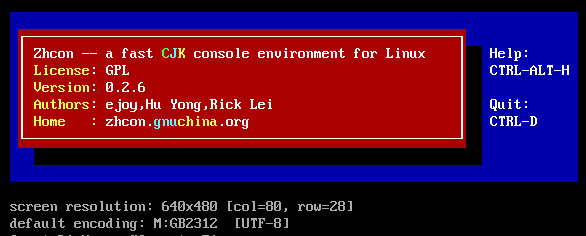
    效果:

  • su root authentication failure

    写这篇文章之前,先说明一下,linux普通用户切换到root用户出现authentication failure的情况很多,这里只记录自己遇到过的情况。我的root密码和普通用户密码是绝对正确的,可是普通用户登陆后su root,始终提示root  authentication  failure。而且root用户也是可以直接登陆,但是就是不能相互切换。最终仔细查看原来是/bin/su文件原因是/bin/su文件被取消了s位,问题找出,解决方法就简单了,直接chmod u+s /bin/su

    之前的

    ls -l /bin/su
    -rwxr-xr-x 1 root root 29152 Feb 16  2011 /bin/su

    修改后:

    ls -l /bin/su
    -rwsr-xr-x 1 root root 29152 Feb 16  2011 /bin/su

    然后重启或退出就OK了

  • 21个非常有用的.htaccess 提示和技巧

    Apache Web 服务器可以通过 .htaccess 文件来操作各种信息,这是一个目录级配置文件的默认名称,允许去中央化的 Web 服务器配置管理。可用来重写服务器的全局配置。该文件的目的就是为了允许单独目录的访问控制配置,例如密码和内容访问。下面是 21 个非常有用的 .htaccess 配置的提示和技巧:

    1. 定制目录的 Index 文件

    1 DirectoryIndex index.html index.php index.htm

    你可以使用上面的配置来更改目录的默认页面,例如你将这个脚本放在 foo 目录,则用户请求 /foo/ 时候就会访问 /foo/index.html

    2. 自定义错误页

    ErrorDocument 404 errors/404.html

    当用户访问页面报错时,例如页面找不到你希望显示自定义的错误页面,你可以通过这种方法来实现。或者是动态的页面:

    1 ErrorDocument 404 /psych/cgi-bin/error/error?404

    3 、控制访问文件和目录的级别

    .htaccess 经常用来限制和拒绝访问某个文件和目录,例如我们有一个 includes 文件夹,这里存放一些脚本,我们不希望用户直接访问这个文件夹,那么通过下面的脚本可以实现:

    # no one gets in here! deny from all

    上述脚本是拒绝所有的访问,你也可以根据IP段来拒绝:

    # no nasty crackers in here! order deny,allow

    deny from all

    allow from 192.168.0.0/24 # this would do the same thing.. #allow from 192.168.0

    一般这些方法是通过防火墙来处理,但在一个生产环境中的服务器来说,这样的调整非常方便。

    有时候你只是想禁止某个ip访问:

    1 # someone else giving the ruskies a bad name.. 2 order allow,deny 3 deny from 83.222.23.219 4 allow from all

    4. 修改环境变量

    环境变量包含了服务器端 CGI 的一些扩展信息,可使用 SetEnv 和 UnSetEnv 进行设置以及取消设置.

    SetEnv SITE_WEBMASTER “Jack Sprat” SetEnv SITE_WEBMASTER_URI mailto:Jack.Sprat@characterology.com


    UnSetEnv REMOTE_ADDR

    5. 301 重定向

    如果你希望某个页面跳转到新的页面:

    Redirect 301 /old/file.html http://yourdomain.com/new/file.html

    下面可以实现对整个路径的重定向

    RedirectMatch 301 /blog(.*) http://yourdomain.com/$1

    6. 通过 .htaccess 实现缓存策略

    通过设置在浏览器上缓存静态文件可以提升网站的性能:

    # year <FilesMatch “\.(ico|pdf|flv|jpg|jpeg|png|gif|swf|mp3|mp4)$”> Header set Cache-Control “public” Header set Expires “Thu, 15 Apr 2010 20:00:00 GMT” Header unset Last-Modified </FilesMatch> #2 hours <FilesMatch “\.(html|htm|xml|txt|xsl)$”> Header set Cache-Control “max-age=7200, must-revalidate”

    </FilesMatch>

    <FilesMatch “\.(js|css)$”> SetOutputFilter DEFLATE Header set Expires “Thu, 15 Apr 2010 20:00:00 GMT”

    </FilesMatch>

    7. 使用 GZIP 对输出进行压缩

    在 .htaccess 中添加下面的代码可以将所有的 css、js 和 html 使用 GZIP 算法压缩:

    <IfModule mod_gzip.c> mod_gzip_on Yes

    mod_gzip_dechunk Yes

    mod_gzip_item_include file \.(html?|txt|css|js|php|pl)$

    mod_gzip_item_include handler ^cgi-script$

    mod_gzip_item_include mime ^text/.* mod_gzip_item_include mime ^application/x-javascript.* mod_gzip_item_exclude mime ^image/.* mod_gzip_item_exclude rspheader ^Content-Encoding:.*gzip.*

    </IfModule>

    使用上面代码的前提是启用 mod_gzip 模块,你可以使用下面脚本来判断 Web 服务器是否提供 mod_deflate 支持:

    <Location> SetOutputFilter DEFLATE

    SetEnvIfNoCase Request_URI \

    \.(?:gif|jpe?g|png)$ no-gzip dont-vary

    SetEnvIfNoCase Request_URI \

    \.(?:exe|t?gz|zip|gz2|sit|rar)$ no-gzip dont-vary </Location>

    如果 Web 服务器不支持 mod_deflate ,那么可使用下面方法:

    <FilesMatch “\.(txt|html|htm|php)”> php_value output_handler ob_gzhandler </FilesMatch>

    8. 强制要求使用 HTTPS 访问

    通过以下脚本可以强制整个网站必须使用 https 方式访问:

    RewriteEngine On

    RewriteCond %{HTTPS} !on

    RewriteRule (.*) https://%{HTTP_HOST}%{REQUEST_URI}

    9. URL 重写

    例如要将 product.php?id=12 重写为 product-12.html

    RewriteEngine on

    RewriteRule ^product-([0-9]+)\.html$ product.php?id=$1

    将 product.php?id=12 重写为 product/ipod-nano/12.html

    RewriteEngine on

    RewriteRule ^product/([a-zA-Z0-9_-]+)/([0-9]+)\.html$ product.php?id=$2

    重定向没有 www 到有 www 的 URL 地址:

    RewriteEngine On

    RewriteCond %{HTTP_HOST} ^viralpatel\.net$

    RewriteRule (.*) http://www.viralpatel.net/$1 [R=301,L]

    重写 yoursite.com/user.php?username=xyz 到 yoursite.com/xyz

    RewriteEngine On

    RewriteRule ^([a-zA-Z0-9_-]+)$ user.php?username=$1 RewriteRule ^([a-zA-Z0-9_-]+)/$ user.php?username=$1


    重定向某个域名到一个 public_html 里新的子文件夹

    RewriteEngine On

    RewriteCond %{HTTP_HOST} ^test\.com$ [OR]

    RewriteCond %{HTTP_HOST} ^www\.test\.com$

    RewriteCond %{REQUEST_URI} !^/new/ RewriteRule (.*) /new/$1

    10. 阻止列出目录文件

    使用下面代码可以防止列表目录里的所有文件:

    Options -Indexes

    或者

    IndexIgnore *

    11. 添加新的 MIME-Types

    MIME-types 依赖于文件的扩展名,未能被识别的文件扩展名会当成文本数据传输

    AddType application/x-endnote-connection enz

    AddType application/x-endnote-filter enf

    AddType application/x-spss-savefile sav

    12. 防盗链

    你不希望别人网站引用你站内的图片、css 等静态文件,也就是传说中的防盗链,可以使用如下脚本:

    RewriteCond %{HTTP_REFERER} !^$

    RewriteCond %{REQUEST_URI} !^/(wp-login.php|wp-admin/|wp-content/plugins/|wp-includes/).* [NC]

    RewriteCond %{HTTP_REFERER} !^http://www.askapache.com.*$ [NC] RewriteRule \.(ico|pdf|flv|jpg|jpeg|mp3|mpg|mp4|mov|wav|wmv|png|gif|swf|css|js)$ – [F,NS,L]

    13. 指定上传文件的大小限制,适用于 PHP

    php_value upload_max_filesize 20M

    php_value post_max_size 20M

    php_value max_execution_time 200 php_value max_input_time 200

    上述脚本中,通过四个参数来设置上传文件的限制,第一个参数是文件的大小,第二个是 POST 数据的大小,第三个是传输的时间(单位秒),最后一个是解析上传数据最多花费的时间(单位秒)

    14. 禁止脚本执行

    Options -ExecCGI

    AddHandler cgi-script .php .pl .py .jsp .asp .htm .shtml .sh .cgi

    15. 修改字符集和语言头

    AddDefaultCharset UTF-8 DefaultLanguage en-US

    16. 设置服务器时区(GMT)

    SetEnv TZ America/Indianapolis

    17. 强制 “File Save As” 提示

    AddType application/octet-stream .avi .mpg .mov .pdf .xls .mp4

    18. 保护单个文件

    正常情况下 .htaccess 可用于限制整个目录的访问,但也可以只限制某个文件

    1 <Files quiz.html> 2 order deny,allow 3 deny from all 4 AuthType Basic 5 AuthName “Characterology Student Authcate” 6 AuthLDAP on 7 AuthLDAPServer ldap://directory.characterology.com/ 8 AuthLDAPBase “ou=Student, o=Characterology University, c=au” 9 require valid-user 10 satisfy any 11 </Files>

    19. 设置 Cookie

    通过环境变量来设置 Cookie

    Header set Set-Cookie “language=%{lang}e; path=/;” env=lang

    基于请求设置 Cookie,该代码发送 Set-Cookie 头用于设置 Cookie 值为第二个括号里的匹配项

    RewriteEngine On

    RewriteBase / RewriteRule ^(.*)(de|es|fr|it|ja|ru|en)/$ – [co=lang:$2:.yourserver.com:7200:/]

    20. 设置自定义的响应 Headers

    Header set P3P “policyref=\”http://www.askapache.com/w3c/p3p.xml\”” Header set X-Pingback “http://www.askapache.com/xmlrpc.php” Header set Content-Language “en-US” Header set Vary “Accept-Encoding”

    21. 根据 User-Agent 来阻止请求

    SetEnvIfNoCase ^User-Agent$ .*(craftbot|download|extract|stripper|sucker|ninja|clshttp|webspider|leacher|collector|grabber|webpictures) HTTP_SAFE_BADBOT

    SetEnvIfNoCase ^User-Agent$ .*(libwww-perl|aesop_com_spiderman) HTTP_SAFE_BADBOT

    Deny from env=HTTP_SAFE_BADBOT

  • 通过SSH修改调整Linux VPS 时间和时区

    美国vps大多都是国外的时间,让我们的程序总是不适应。那么如何调整linux的时间为北京时间?修改linux vps的时间和时区,有什么办法?

    首先,需要ssh登录vps或服务器。 date 命令可以查看时间和时区。然后输入以下命令:

    rm -rf /etc/localtime


    ln -s /usr/share/zoneinfo/Asia/Shanghai /etc/localtime


    再date查看下时间和时区,时间是否正确了。如果已经正确,那么OK搞定。 SSH操作范例:

    如果还是有些不对,那么需要用命令 ntpdate stdtime.sinica.edu.tw 来校准时间。ntpdate stdtime.sinica.edu.tw 如果提示无此命令,那么需要先安装 ntpdate

    CentOS 安装方法:

    yum -y install ntpdate ntp


    Ubuntu安装方法:

    sudo apt-get install -y ntpdate ntp